Loading the guide…
Understand workflow runs and fix failures
Learn how to read run history and per-step detail, why a run fails, how AI-fallback branches and the run cap behave, and what to check when a run stops.
On this page
A run is one journey through a workflow: a single trigger fired, and the graph executed step by step for it. When automations misbehave, the run history is where you find out why. This article explains how to read runs and their per-step history, what makes a run fail, how AI-fallback branches and the concurrent run cap change behavior, and a practical checklist for when a run stops before you expected. If you are new to workflows, read build your first workflow first.
What a run is
Each time a trigger fires, maxclicks starts a run. The run carries a growing bag of data and executes your steps in order, following the links you drew until it reaches an end or a step fails. Runs are durable: they survive a server restart, so a run parked in a long Delay resumes correctly days later.
Runs execute steps sequentially. There is no parallel branching: a run is always at exactly one step. Every step that consumes a record re-reads it fresh from the database, so the values a run acts on reflect each record's current state, not a snapshot from when the run began. The exception is a deleted record, which flows onward as a frozen snapshot because it no longer exists to re-read.
Read the run history
Open a workflow and go to its Runs tab. This view is real and live: runs and their progress stream in as they happen, which is an automation executing in real time.
- Open the Runs tab
From the workflow, open the Runs tab. You see the runs the workflow has started, each with its status and when it began.
- Open a single run
Select a run to see its per-step history: which steps it entered and left, the timestamps, which slot it took out of each controller, and whether any step failed.
- Read the failure reason
If a run ended on a failure, the step where it stopped carries a recorded reason. That reason is your starting point for fixing the cause.
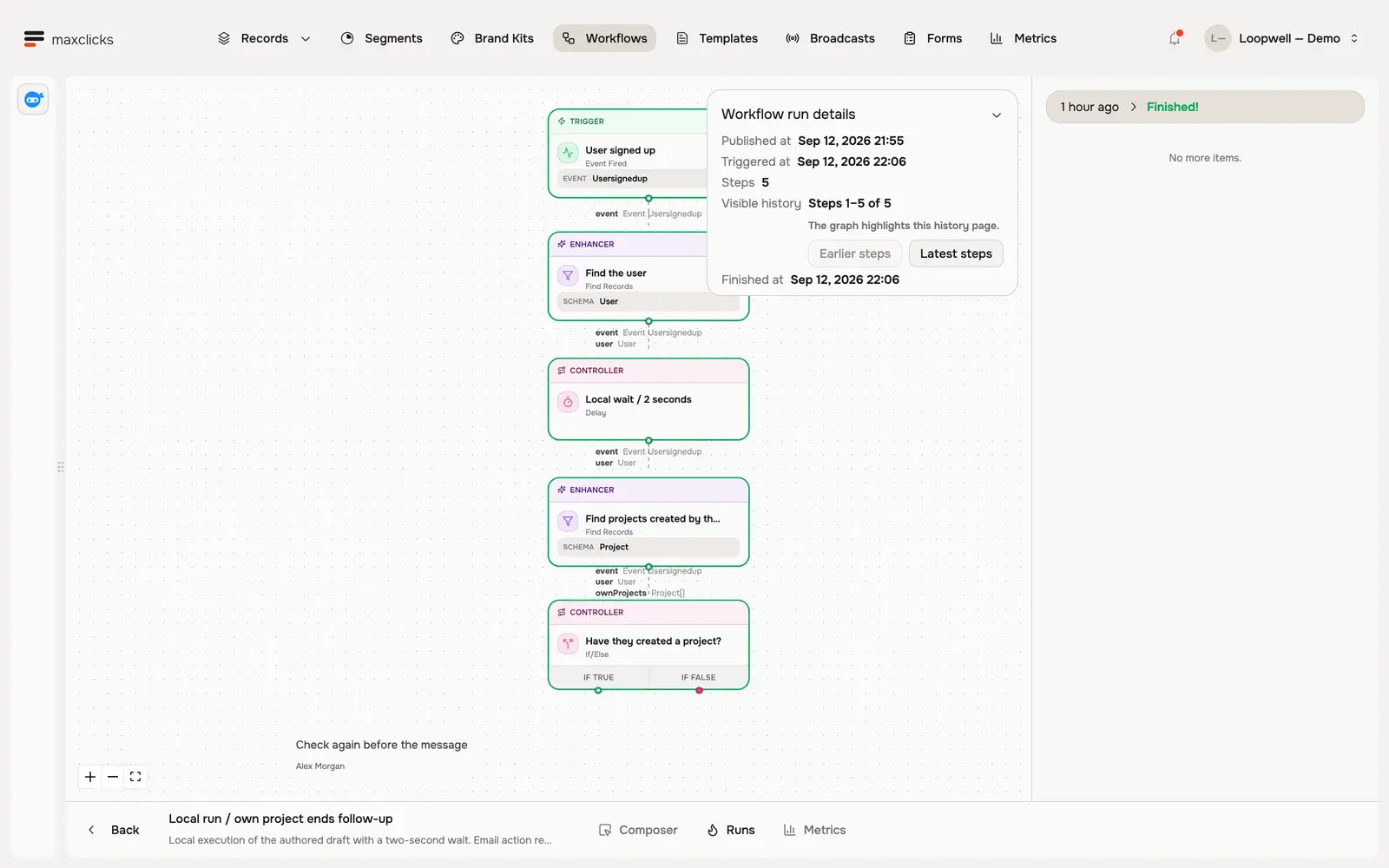
The per-step history also records split lineage: when one run fans out into several, you can see which parent run a child came from. That makes it possible to trace a whole tree of runs back to the single trigger that started them.
Why a run fails
maxclicks does not retry failed steps. Any step failure ends the entire run, with the reason recorded on that step. There are no partial retries and no automatic resumption, so a failed run stops where it failed.
Runs end early or fail for a handful of recurring reasons:
| Reason | What happened |
|---|---|
| Step error | A step could not complete, for example an HTTP Request step that got an error response. The reason is recorded on the step and the run ends. |
| Out of credits | The space reached zero available credits mid-run. Executed steps charge a small fee, AI steps and AI-fallback branches bill tokens, and sends consume quota, so a run halts when credits run out. |
| Zero matches on a fan-out | A step set to one run per record, or a For Each over an empty array, found nothing. The run ends there. |
| Run cap exceeded | A fan-out would push the space past its concurrent run cap, so new runs fail rather than queue. |
Because a failure is terminal, the fix is always to correct the underlying cause and rely on future runs, or re-trigger the scenario, rather than expecting the failed run to pick back up.
AI-fallback branches
Some controller steps can run in two modes, and knowing which you are in explains both cost and behavior. An If/Else, a Switch, and a Delay normally use a generated expression: fast, deterministic, and cheap. But if you describe the step's requirement and no expression is generated for it, the step falls back to a per-run AI call at runtime.
AI fallback is slower, non-deterministic, and billed on every run, because the AI decides the branch or the delay each time. This is intentional for conditions only judgment can settle, such as "does this product fit the customer's stated interests?". For anything a rule can decide, generate the expression instead so the step behaves deterministically and costs almost nothing. maxinja generates these expressions for you; see use segments in broadcasts and workflows for how conditions are described and generated.
If a run took an unexpected branch, check whether the controller is in AI-fallback mode. A non-deterministic decision is the usual explanation for a branch that varies run to run.
Fan-out, splits, and the run cap
Steps that find or create multiple records, and the For Each step, can multiply a run. A Find Records step decides between the two behaviors with a single checkbox in its sidebar, "One run per record, or one run for the whole list":
- Checked, the step fans out one independent run per record. Each child run proceeds on its own. If there are zero matching records, the run ends right there.
- Unchecked, a single run continues, carrying all the records as one array property.
- For Each always fans out, one run per item in the array.
Splits count against a per-space concurrent run cap of 1000 plus 20 per object record in the space. A fan-out that would exceed the cap fails rather than queuing. If runs are failing at a step that multiplies them, and the space handles a lot of automation at once, the cap is a likely cause.
What to check when a run fails
When a run stops before you expected, work through this checklist against its per-step history.
- Find the step that ended the run
Open the run and locate the last step it reached. The recorded failure reason there tells you what happened.
- Rule out credits and quota
Confirm the space has available credits and, on the Free plan, remaining email quota. Runs halt mid-flow when credits reach zero, and sends stop when the monthly email cap is hit.
- Check filters and matches
If the run ended quietly rather than on an error, a find-records step or a split may have matched zero records, which ends the run. Verify the segment or condition matches what you expect.
- Look for AI-fallback surprises
If a branch or delay behaved inconsistently, check whether the controller is running as an AI-fallback decision rather than a generated expression.
- Consider the run cap
If failures cluster at a fan-out step under heavy load, the concurrent run cap may be the limit. Narrow the records that fan out with a tighter filter.
Costs and observability
Every executed step charges a tiny operation fee. AI steps and AI-fallback branches and delays additionally bill AI tokens, and send-email steps consume email quota. This is why a workflow that loops broadly or leans on AI decisions costs more than a lean, expression-driven one. Keeping conditions on generated expressions and filters tight keeps both cost and run volume under control.
For observability, the Runs tab gives you live run updates and per-run step history with failure reasons, all in real time. The Metrics tab adds the aggregate view for a published version you select: the average time a run spent in each step, how many runs traversed each link, and a delivery and engagement funnel for every Send Email step. For results across every send in the space, including broadcasts, use the space-level metrics dashboard and each broadcast's own metrics, as explained in track email performance.
Frequently asked questions
Does a failed step retry automatically?
No. Any step failure ends the whole run immediately, with the reason recorded on that step. There are no retries and no resumption. Fix the underlying cause so future runs succeed, or re-trigger the scenario.
Why did my run stop without an error?
A run also ends quietly when a split or a For Each finds nothing to act on, since zero matches or an empty array leaves nothing to continue with. Check that the step's segment or condition actually matches the records you expect.
Why does the same branch decision vary between runs?
The controller is probably running as an AI-fallback decision rather than a generated expression. AI fallback is non-deterministic and evaluated per run. Generate an expression for the condition if you want deterministic, repeatable branching.
Why are new runs failing under heavy load?
The space has a concurrent run cap of 1000 plus 20 per object record. Fan-out steps that would exceed it fail rather than queue. Tighten the filters on triggers and find-records steps so fewer runs fan out at once.
Where do I see workflow email performance?
Open the workflow's Metrics tab and pick the published version you want to inspect. Each Send Email step there shows its own delivery and engagement funnel, built from the emails that step actually sent. For results across every send in your space, use the space-level metrics dashboard and each broadcast's own metrics tab.
Did this article answer your question?