Loading the guide…
Personalize with Liquid and Adaptyle
Learn how Liquid variables and maxinja personalization prompts work together to tailor an email to each recipient.
On this page
maxclicks personalizes email in two layers. First, Liquid fills in exact values from your data: a first name, an order total, a link. Then an optional AI pass, called Adaptyle, rewrites or generates copy from plain instructions you write inline, on brand. This article covers both layers and when to use each, wherever you write email: a broadcast, a stored template, or a workflow send-email step.
The two stages of personalization
Every email render runs the same pipeline in a fixed order.
- Liquid interpolation is deterministic. It substitutes variables with real values from your data. The same input always produces the same output. This is where exact fields go.
- The AI personalization pass runs second, over the already-interpolated content, but only when your content actually contains Adaptyle prompts. It reads your instructions and writes or rewrites copy accordingly. It is powered by a large language model, so it is generative, not a fixed substitution.
Because Liquid runs first, an Adaptyle prompt can reference values that Liquid has already filled in. Because the AI pass is optional, an email with no prompts renders fully deterministically and costs nothing in AI tokens. You can use Liquid alone, both layers together, or Liquid with a light touch of AI.
Liquid variables
Liquid is the deterministic layer. You insert a variable where you want a value to appear, and at render time maxclicks replaces it with the real value for that recipient. In the preview and in test sends, the value comes from your sample data; in a live send, it comes from the actual contact and the data attached to the send.
A variable references a property of the data your email expects. In a broadcast, that property is named after the contact schema's slug, so a broadcast bound to a Customer schema slugged customer exposes the recipient as customer:
Hi {{ customer.firstName }}, thanks for being with us.
You can reference any stored attribute the data exposes, provide fallbacks for empty values, and use Liquid's standard filters and control flow. The key rule is that the variable must match a property the email's data actually provides, so {{ contact.firstName }} renders empty unless a property is genuinely named contact. Open the Data panel to read the exact property names for this email, and use the editor's variable suggestions rather than typing a name from memory. A template that expects an order alongside the recipient exposes the order's fields too.
Check your sample data before you rely on the preview. A variable with nothing behind it renders empty, which is the most common reason a personalized field looks blank in a test. Choose an editor mode covers binding records to your variables and generating sample data.
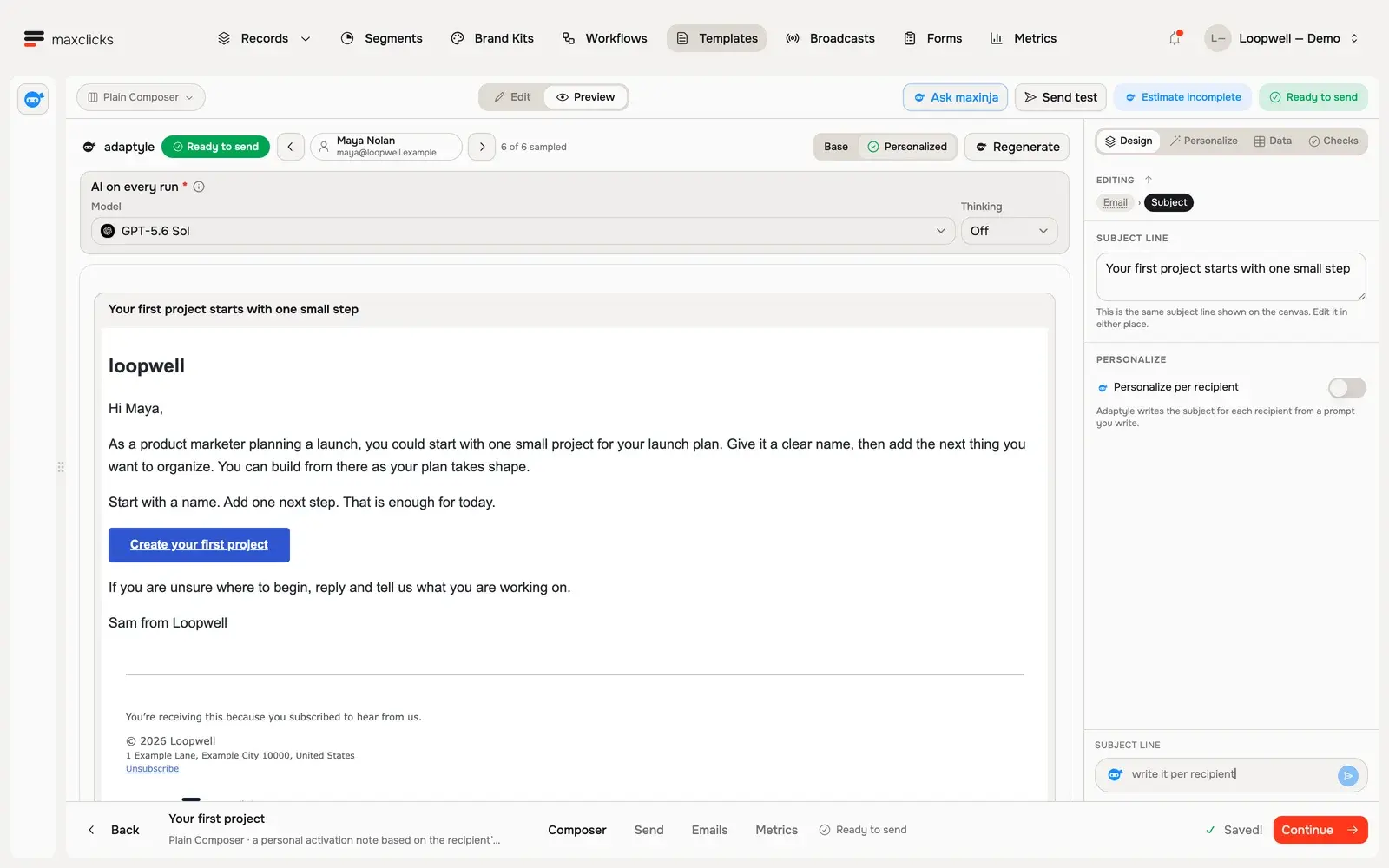
Walkthrough steps
With Maya selected, request a real personalized preview and wait for it to finish. Read the generated next-step advice using her product marketing role and launch use case. The template retains its button, sign-off and footer. No email is sent; separate generations can vary.
Let maxinja finish the expression
As you type Liquid in the visual editors, the Dynamic Composer and the Plain Composer, maxinja suggests the rest of the expression as faded text. Press Tab to accept it, or Escape to dismiss it. Each suggestion is a small AI call, so it draws on your credits. The code editors do not suggest.
An admin controls this for the whole space under Settings, then maxinja, then Editor autocomplete. Automatic suggests as you type, a moment after you pause. Off turns suggestions and their cost off entirely, and nothing is suggested no matter what you type.
Adaptyle prompts
Adaptyle is the AI layer. Instead of a fixed value, you write an instruction inline, and the AI carries it out when the email renders. There are two kinds of prompt, and the difference is whether you give the AI existing content to work from.
Generation prompts
A generation prompt gives the AI an instruction and asks it to write new content. You write the instruction between triple angle brackets:
<<<Write a one-line welcome for a new trial user, warm and brief>>>
At render time, the AI replaces the prompt with copy that follows the instruction. Use a generation prompt when you want the AI to draft something from scratch: an intro line, a subject variation, a short section tuned to who is receiving it.
Modification prompts
A modification prompt gives the AI an instruction first, then the content to start from. You separate the two with three colons:
<<<Rewrite this warmer and mention it ships tomorrow:::Thanks for your order.>>>
The AI applies the instruction on the left to the content on the right, and the result replaces the whole tag. Use a modification prompt when you have copy you like but want it adapted: shortened, warmed up, rephrased for a segment, or adjusted for context. The content you provide anchors the output, so a modification prompt is more predictable than generation from nothing.
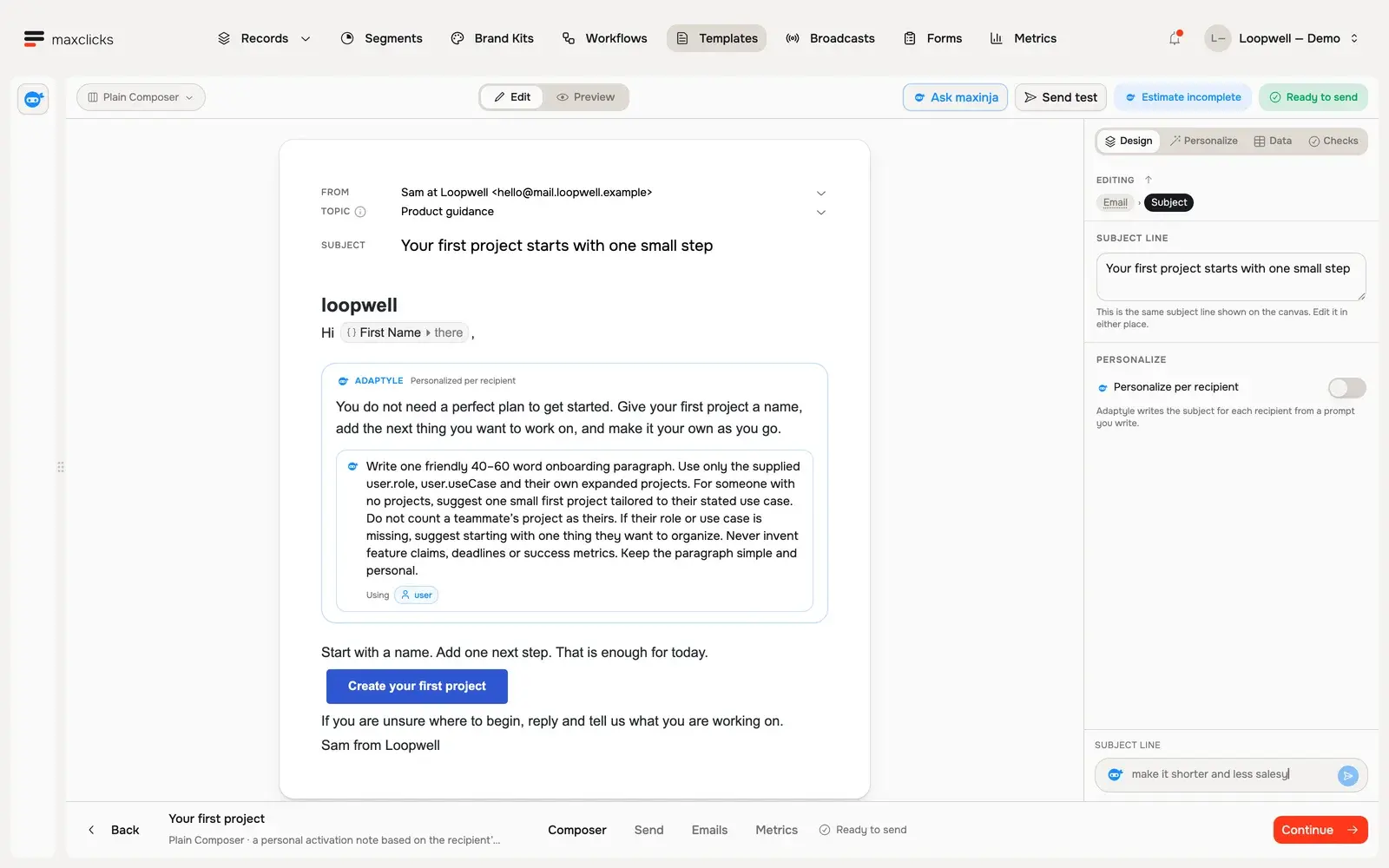
Walkthrough steps
Inspect the Plain Composer, open its existing generated Maya preview, review the user binding in Data, and return to the authored paragraph and its Adaptyle instructions. This tour uses an already generated preview and does not send an email.
Branding is injected automatically
When the AI pass runs, maxclicks automatically injects your branding into the context under a reserved key, so the AI writes in your brand's voice and style without you restating it in every prompt. The branding comes from your published brand kit: its values, tones, and writing rules shape what the AI produces. Publish and select a brand kit to get on-brand output; a prompt like "write a warm welcome" then reads as your brand would write it, not generically.
When to use which
Liquid and the two prompt kinds solve different problems. Reach for the one that matches your intent.
| You want | Use | Why |
|---|---|---|
| An exact value from data | A Liquid variable | Deterministic, precise, no AI cost |
| New copy written for you | A generation prompt | The AI drafts from your instruction |
| Existing copy adapted | A modification prompt | The AI rewrites the content you supply |
| On-brand AI writing | Any prompt plus a published brand kit | Branding is injected into the AI context |
A good pattern is to combine them. Use Liquid for the facts, a name, a total, a link, and a modification prompt to adapt the surrounding copy. Keep exact values in Liquid so they are never approximated by the AI, and let Adaptyle handle the tone and phrasing that benefit from a human-sounding rewrite.
Keep prompts focused. A short, specific instruction produces a more reliable result than a long, vague one. If the output drifts, tighten the instruction or switch a generation prompt to a modification prompt so the AI has content to anchor on.
How rendering and cost work
Understanding the pipeline explains what you are billed for.
Every real send and every preview runs Liquid interpolation, then the AI personalization pass, then footer injection. The AI pass, and the tokens it bills, run only when the content contains Adaptyle prompts. A prompt-free email skips the generative step and costs no AI tokens. The current per-recipient customization operation has no fixed fee. AI usage is billed in credits; sending allowances, overages and other operation charges are separate.
The practical takeaway: Liquid is effectively free and exact, so use it for anything you can express as a field. Add Adaptyle prompts where a tailored, human-sounding rewrite is worth an AI call per recipient. For a broadcast, that AI call happens once per recipient, so a heavily prompted email over a large audience is a real cost to weigh.
Let maxinja help
You do not have to write prompts and Liquid by hand. maxinja can build and refine email content for you, including the personalization, from a plain description of what you want. Describe the email and the audience, and it drafts content with the right variables and prompts in place, which you then adjust. See what the assistant can do in meet maxinja.
Frequently asked questions
What is the difference between a Liquid variable and an Adaptyle prompt?
A Liquid variable substitutes an exact value from your data and is deterministic. An Adaptyle prompt asks the AI to write or rewrite copy at render time and is generative. Use Liquid for precise fields and Adaptyle for tailored phrasing.
When does the AI personalization pass run?
Only when your content contains Adaptyle prompts. A prompt-free email renders deterministically through Liquid and the footer, with no AI tokens billed. The current per-recipient customization operation has no fixed fee; sending and other operations have their own billing rules.
How do I make the AI write in my brand's voice?
Publish and select a brand kit. When the AI pass runs, maxclicks injects your branding into its context automatically, so the AI writes with your brand's values, tones, and rules. Without a brand kit, the output reads generically.
Why is maxinja not suggesting Liquid as I type?
Either you are in a code editor, which never suggests, or Editor autocomplete is set to Off for your space. An admin changes that setting under Settings, then maxinja. With it Off the server serves no suggestions at all, so even a visual editor stays quiet.
Why does my Adaptyle output change between test sends?
The AI pass is generative, so output can vary with the input and between runs. Anchor it with a modification prompt that supplies the content, keep instructions short and specific, and preview against realistic sample data.
Can I use personalization in a broadcast?
Yes. Liquid variables and Adaptyle prompts work in broadcasts, templates, and workflow emails alike. Evaluated attributes work too, once you tick them in the Data panel.
Did this article answer your question?