Loading the guide…
Create a segment
Learn how to describe an audience in plain language and let maxinja build a saved, reusable contact filter for your space.
On this page
A segment is a saved audience filter over one contact schema. Instead of assembling rules by hand, you describe the people you want in plain language and maxinja generates the filter for you. This article covers creating a segment, reading its live preview, refining it with follow-up prompts, and editing it later. Once you have a segment, learn where to put it to work in use segments in broadcasts and workflows.
What a segment is
A segment is a named, AI-defined filter bound to one contact schema, such as Customer or Subscriber. It answers a single question: which contacts in this schema match this description?
Every segment stores three things:
- Your requirements: the plain-language prompt that describes the audience. You refine it over time.
- A condition description: a readable summary of exactly what the segment matches, written for you to review.
- The underlying logic: generated and held by maxclicks. You never see or write the raw code.
You work entirely with the requirements and the description. maxclicks keeps the generated logic behind them, so refining a segment means adjusting your words, not editing code. This is the same generated-logic pattern maxclicks uses across the app, described in meet maxinja, your AI assistant.
Because a segment is bound to one contact schema, it only ever matches contacts of that schema. If you message two different kinds of people, for example Customers and Subscribers, you build a segment for each schema.
Create a segment
You build a segment on the Segments page. There you describe the audience to maxinja in the prompt box, and maxinja turns your description into a saved filter.
- Open Segments and start a new one
Open Segments from the top navigation and create a new segment. Give it a clear name you will recognize later, such as Active trial users.
- Bind it to a contact schema
Choose the contact schema the segment filters, such as Customer. The segment matches only contacts of that schema, and this binding stays fixed for the life of the segment.
- Describe your audience
In the prompt box, which reads "Describe your segment" while it is empty, write who you want in plain language, for example "customers who signed up in the last 30 days and have not placed an order". Name the attributes and values that matter, then send the prompt.
- Review what maxinja generated
maxinja produces a readable condition description and a live matching preview. Read the description to confirm it captures what you meant, then save the segment.
Walkthrough steps
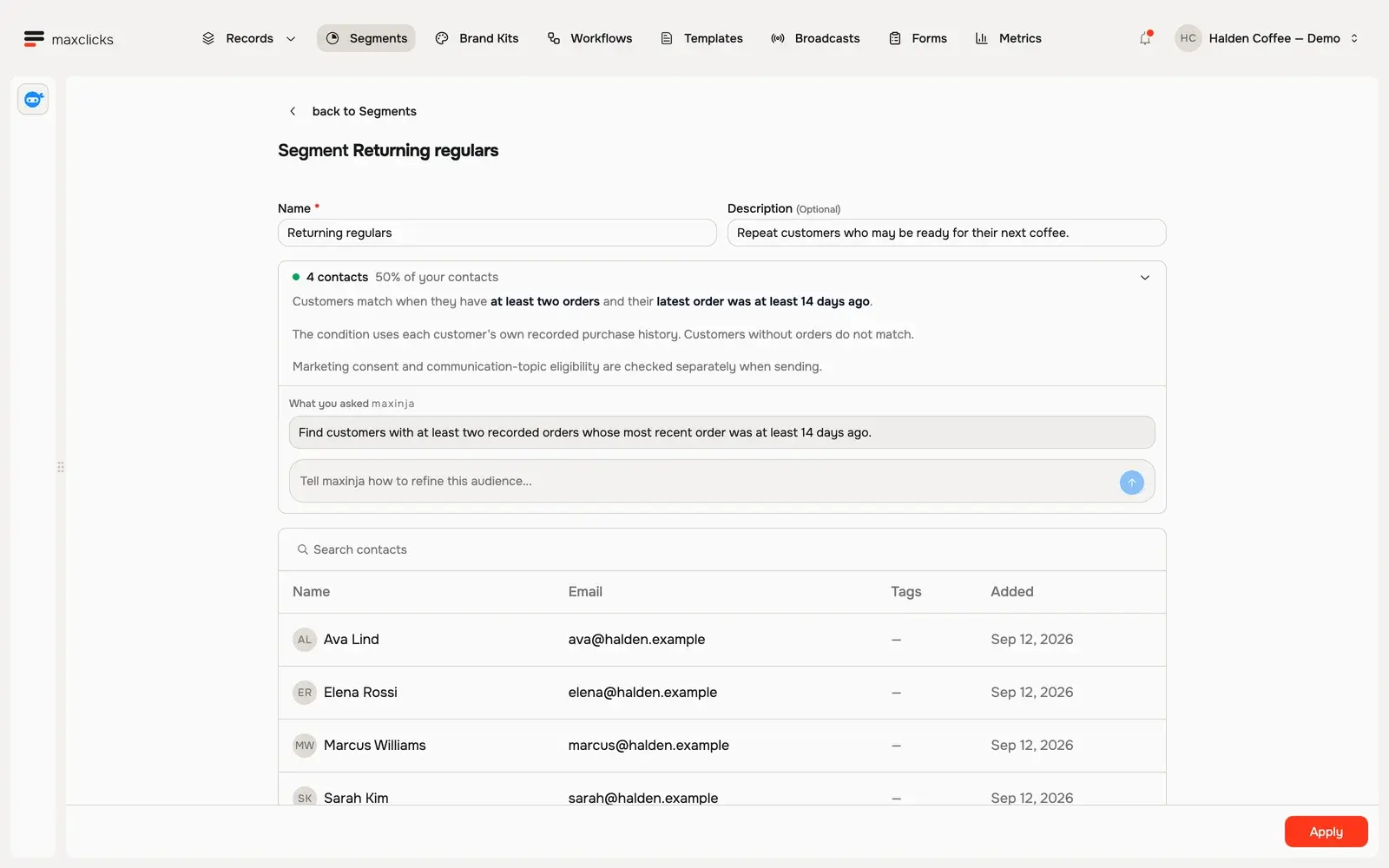
Review Returning regulars: at least two orders and no order in the last 14 days. Inspect the four matching customers, then return to the requirement and refinement box. This walkthrough inspects an existing saved segment.
Your segment is only as good as the schema behind it. maxinja can filter on any attribute your contact schema defines, including computed values, so the richer your schema, the more precise your segments can be. If you have not built out your schema, start with create your first contact schema and add attributes to a schema.
Review the condition and the live preview
Before you rely on a segment, confirm it matches the people you actually mean. maxclicks gives you two ways to check, both available before you save.
The condition description
The condition description is maxinja's plain-language account of what the segment matches. It is precise but readable, which is how the logic is verified without seeing any code. Read it as a sentence and ask whether it is exactly what you intended. If the description says "customers created in the last 30 days" but you meant "in the last 7 days", the prompt needs another pass.
The description is the thing you review and share. The description explains the intended condition. Check the actual matching count and contacts too: a readable summary alone does not prove the generated filter matches your intent.
The live matching count and contact table
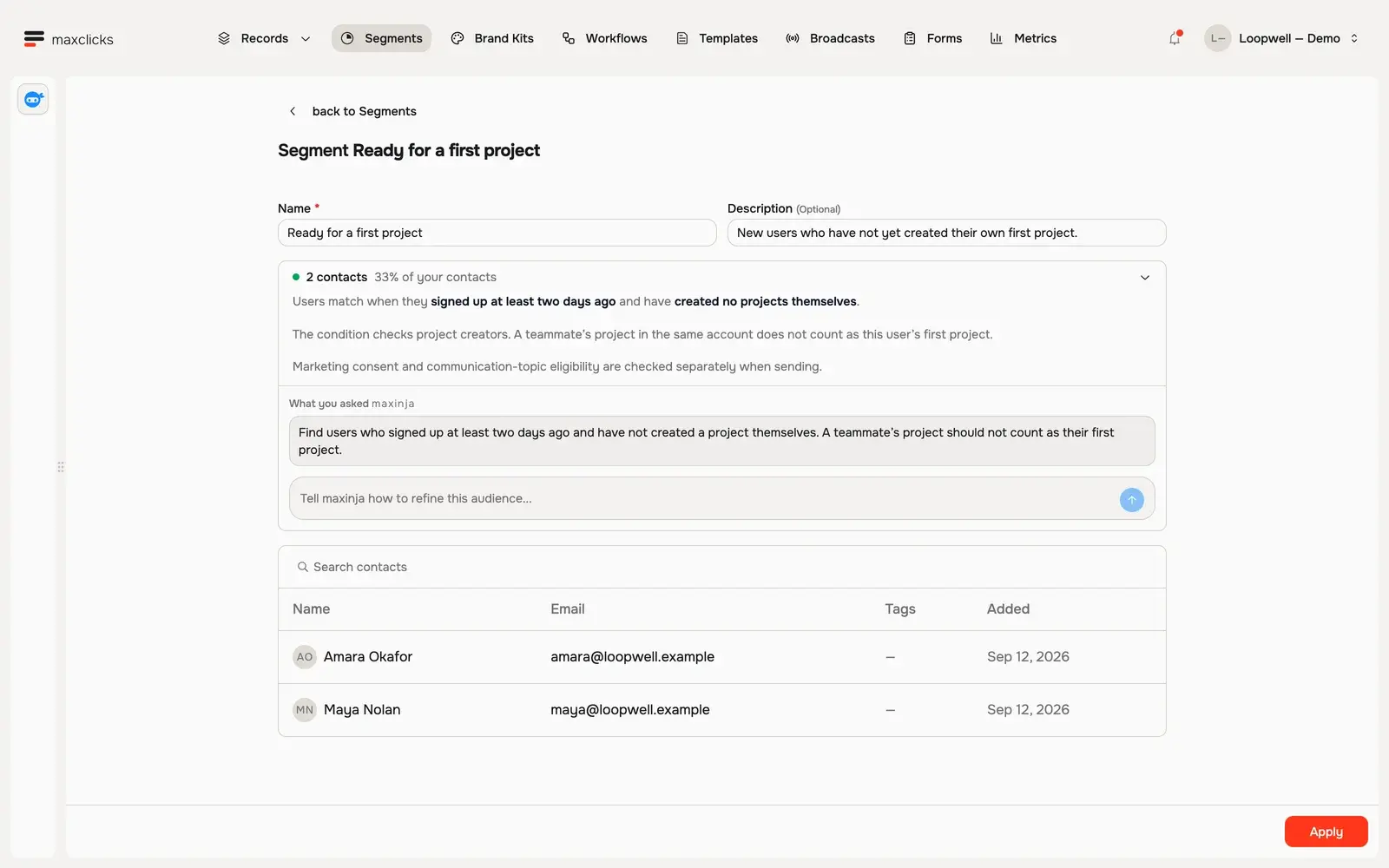
Alongside the description, maxclicks shows a live count of how many contacts currently match, and a paginated table of the actual matching contacts. Use both as a reality check:
- A count of zero means no one matches. Your filter is probably too narrow, or names an attribute or value that no contact has.
- A count far larger than expected means the filter is too broad. Tighten the prompt.
- Scan the contact table to spot people who should not be there, or who are missing.
Walkthrough steps
Review the first-project audience and its two matching users. The condition uses signup age and projects created by that individual. Return to the saved requirement and refinement box. Counts refresh from the actual demo records.
The count reflects your contacts as they are right now. As contacts change, are imported, or are deleted, the same segment matches a different set the next time it runs. A segment is a living filter, not a frozen list.
Refine with follow-up prompts
You rarely get a segment perfect on the first prompt, and you do not have to. Segments are built to be refined.
When you send a follow-up prompt, maxinja treats it as a refinement of your existing requirements, not a replacement. It reads what the segment already means, applies your new instruction, and regenerates the condition and preview. Changes layer conversationally:
- "Also exclude anyone tagged
internal." - "Only include contacts who have opened an email in the last 90 days."
- "Change the window from 30 days to 14 days."
After each prompt, re-read the condition description and watch how the live count moves. A refinement that drops the count to zero, or barely changes it, is a signal that maxinja read your instruction differently than you meant. Rephrase and try again. Because every generation is an AI action, each refinement uses a small amount of credits.
Build on existing segments
A segment can reference another segment, so audiences compose instead of repeating the same conditions.
For example, if you already have a High-value customers segment, you can describe a new one as "high-value customers who are also in a trial", and maxinja can build on the existing segment rather than re-deriving what "high-value" means. Keep your building-block segments well named and clearly described, since their descriptions are what make them reusable.
There is one consequence to know: once a segment is referenced by another, it is in use and cannot be deleted until the reference is removed. The same protection applies wherever a segment is used, which use segments in broadcasts and workflows covers in full.
Edit a segment
A saved segment is not locked. You can rename it, refine its condition with more prompts, and re-check the live preview at any time, all from its page on Segments.
- Open the segment
Open Segments and select the segment you want to change. Its condition description and live preview load.
- Refine or rename
Send another prompt to adjust the condition, or edit the segment's name. Once a condition exists the box invites you to refine the audience rather than describe it. maxinja regenerates the description and preview, which confirms the change.
Editing a segment changes it everywhere it is used. If a broadcast audience or a workflow trigger relies on the segment, they immediately use the new definition the next time they resolve. That is usually what you want, since a segment is meant to be a single, reusable definition, but it is worth remembering before you loosen or tighten a widely used segment.
One thing you cannot change is the contact schema a segment is bound to. If you need the same audience concept on a different schema, create a new segment on that schema instead.
Segments and other generated logic
Segments are the most visible example of maxclicks generating logic from a description, but they are not the only one. Broadcast audiences, workflow step conditions, evaluated attributes, and webhook filters all use the same flow: you describe what you want, maxinja generates the logic, and you review a readable description with a live preview. Learning to write a good segment prompt makes you better at all of them.
The difference is that a segment is a named, saved, reusable filter, while a broadcast's custom audience filter or a workflow condition belongs to that one entity alone. When an audience is worth reusing, save it as a segment. Use segments in broadcasts and workflows explains when to reach for each.
Frequently asked questions
Do I ever see or write the underlying filter code?
No. maxclicks generates and stores the logic behind the scenes and never exposes it. You work with your plain-language requirements and the condition description maxinja writes for you. To change what a segment matches, you refine the prompt, not any code.
Can one segment span two contact schemas?
No. A segment is bound to exactly one contact schema and matches only contacts of that schema. If you need the same idea across two schemas, build a separate segment on each. The binding is set when you create the segment and cannot be changed afterward.
Why does my segment's count keep changing?
A segment is a live filter, not a saved list of people. It re-evaluates against your current contacts each time it runs, so the count moves as contacts are added, edited, imported, or deleted. That is expected: it is how the same segment always reflects who matches right now.
My live count is zero. What went wrong?
A zero count means no contact currently matches the condition. Usually the filter is too narrow, or it references an attribute or value that no contact actually has. Re-read the condition description to see how maxinja interpreted your prompt, then refine it. Check that the attributes you named exist on the schema and are populated.
Does generating or refining a segment cost credits?
Yes. Each generation, including every refinement prompt, is an AI action that consumes a small amount of credits. Reviewing the description and the live preview does not. A space with no available credits cannot generate or refine segments until it has credits again.
Did this article answer your question?