Give your email agent the brief. It builds and refines the template, while Adaptyle uses selected customer data and brand context to write the marked content for each recipient.
Generated for Sarah Kim · Halden demo workspaceWalkthrough steps
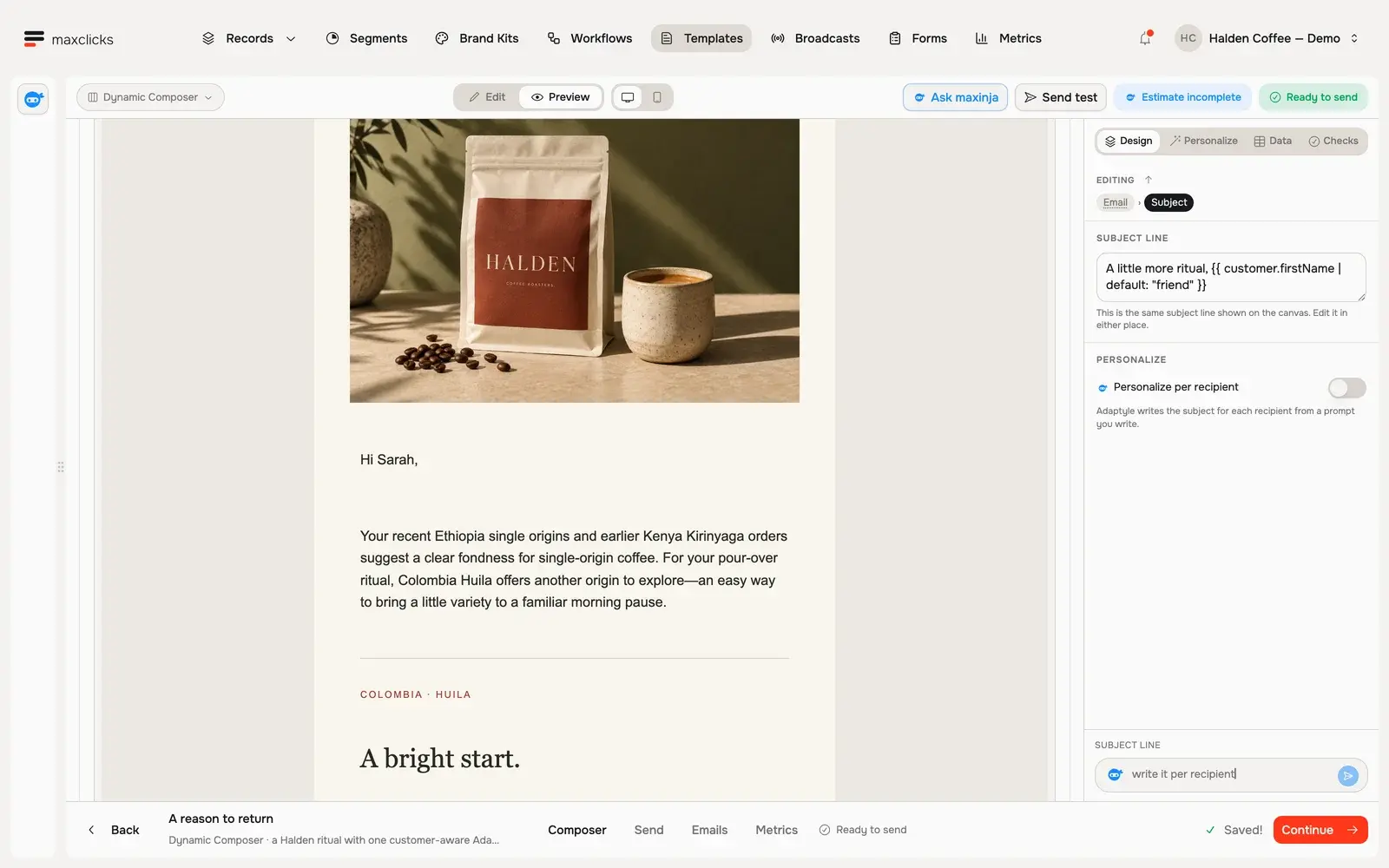
With Sarah selected, request a real personalized preview and wait for it to finish. Scroll to the generated paragraph connecting her Ethiopia and Kenya purchase history and pour-over preference to the supplied Colombia Huila offer. No email is sent; separate generations can vary.
Her recorded single-origin purchases give the introduction a personal starting point.The offer stays Colombia Huila · 250g · $24.
Showing Sarah Kim’s customer context and generated preview. Her recorded single-origin purchases give the introduction a personal starting point.
One brief. Three reasons to return.
A real Halden demo campaign: one Colombia Huila offer, with an introduction generated from each customer’s purchase history.
The instruction
Introduce Colombia Huila using the supplied purchase history. Keep the $24 offer and product link fixed.
The customer context
Sarah buys single-origin coffee. Marcus buys espresso. Priya last bought a gift.
The generated samples
Compare three personal introductions to the same Colombia Huila offer inside the same branded template.
Give the agent the writing job.
Ask maxinja to create the email, refine a block or add recipient-specific instructions. The resulting template opens in the composer, with the authored structure and generated regions available to inspect.
Keep the facts. Change the message.
Use Liquid fields for essential prices, dates and links. Adaptyle writes the marked regions from the selected context, so a shared template can give different customers different reasons to act.
Use the same mechanism wherever email happens.
Agents can build personalized content for broadcasts, workflow email steps and stored templates triggered through REST or SMTP. Inspect sample generations; final wording can differ, and AI usage is metered separately from sending.
In practice
What happens inside a personalized email.
The email agent builds the template from your direction. Adaptyle then uses its selected context and instructions to adapt the marked content for each recipient.
You bring
An email template, recipient data, a published brand kit and instructions inside selected content regions.
You do
Tell the email agent what to build or change, including the fixed facts and the copy that should adapt. Inspect the template and representative recipient samples.
You get
A rendered subject and email body for the recipient, with authored content outside the generated regions preserved.
Illustrative example · Halden Coffee
A new coffee, without changing the offer.
The starting context
Customer
Sarah · 4 single-origin orders
Last purchase
Ethiopia single origin · 28 days ago
Selected product
Colombia Huila · 250g
Fixed offer
$24 · supplied product URL
The task
Introduce Colombia Huila as a next pour-over choice. Refer to Sarah’s previous single-origin order. Keep the offer and product link in fixed template fields.
The result to inspect
Sarah’s actual preview draws on her single-origin purchases and pour-over preference. The separate offer block stays Colombia Huila, 250g, $24, with its supplied product URL.
Liquid for values. Adaptyle for writing.
Liquid inserts supplied values such as a name, order number, amount or URL. Adaptyle writes within the regions you mark with instructions. You can combine both in one email, or send a static template without invoking AI.
Four editor modes, shared personalization.
The shared composer supports four starting points. Choose a visual surface or write the markup directly; personalization works across all four.
Dynamic Composer: visual MJML blocks for designed, responsive emails.
Plain Composer: visual HTML blocks for a simpler written message.
MJML Code: edit the MJML source directly.
HTML Code: bring or write the complete HTML email.
Inspect the sample and preserve essential facts.
Compare the source data with the generated subject and body. Keep prices, deadlines, required wording and destination URLs outside AI regions. Those protected regions constrain what changes; they do not guarantee that every statement generated inside an AI region is correct.
Know what a preview and an editor switch mean.
A preview is a sample generation; final wording can differ when sending renders again with current context. AI previews use workspace credits. Supported editor conversions are one-way: code does not convert back to a visual editor, and HTML does not convert back to MJML.