Loading the guide…
Manage suppressions
Learn what suppressions are, why they apply to an address rather than a contact, the reasons they are created, which sends they block, and how to suppress or unsuppress one.
On this page
A suppression is a block that stops maxclicks from emailing an address. Suppressions protect your sending reputation by keeping mail away from addresses that unsubscribed, bounced, or complained. This article explains why suppressions attach to an address rather than a contact, the reasons they are created, which sends each reason blocks, and how you add or remove one.
What a suppression is
A suppression is a block on an email identifier, meaning the address itself, not on a contact record. This distinction matters more than it first appears.
Because the block lives on the address, it affects every contact that shares that address. If two contacts in different schemas both use jordan@example.com and that address is suppressed, mail is blocked to both. Suppressing or unsuppressing one of them changes the outcome for all of them, because there is really only one thing being blocked: the address.
Every suppression maxclicks creates today is scoped to the space that created it. It stops your sending to that address and never touches another space's.
Why suppressions are created
Suppressions come from several sources. Some are automatic and some are added by your team. Knowing the reason tells you both why mail stopped and what it takes to resume.
| Reason | Created by | What it means |
|---|---|---|
| Unsubscribed | The contact | The contact opted out of all marketing by unsubscribing from a topic-less email. |
| Hard bounce | The system | The address permanently rejected mail. It does not exist or refuses delivery for good. |
| Spam complaint | The system | The recipient marked your mail as spam through their inbox provider. |
| Consecutive soft bounces | The system | Defined for repeated temporary failures, but not created automatically today. |
| Manual | A teammate | Someone on your team blocked the address, for any operational reason. |
| Legal | A teammate | Someone on your team blocked the address to satisfy a legal or compliance requirement. |
Two of these are worth extra attention.
Hard bounces and spam complaints are handled automatically and forcefully. When either occurs, maxclicks creates the suppression and also revokes the email subscription of every contact that shares the address, writing a system audit trail entry for each. This double action keeps a bad address from being retried and keeps a complaining recipient from receiving more mail, both of which protect your deliverability.
Unsubscribed suppressions come from the opt-out flow. A contact who unsubscribes from a marketing email that was not bound to a topic gets an unsubscribed suppression on their address. Topic-bound unsubscribes do not create a suppression; they only leave the topic. That mechanism is covered in how unsubscribes and preferences work.
How far a suppression reaches
Suppressions are scoped to your space. Whether the block came from an unsubscribe, a hard bounce, a spam complaint, or someone on your team, it applies to your sending only. The data model reserves a global scope for future platform-wide blocks, but nothing in the product creates one today.
If your team runs more than one space, each keeps its own block list. Suppressing an address in one space does not stop another space from mailing it, and unsuppressing in one does not unblock the other.
Which sends a suppression blocks
A suppression does not block everything equally. What it stops depends on whether the content is marketing or transactional, the same distinction described in understand transactional vs marketing email.
- Marketing content is blocked by any suppression at all. An unsubscribe, a manual block, a legal block, a bounce, or a complaint all stop marketing mail to the address.
- Transactional content is blocked only by a bounce suppression. A receipt or password reset still reaches an address that unsubscribed or was manually suppressed, but it will not be sent to an address that hard-bounced, because that address is failing.
This asymmetry is intentional. A contact who unsubscribed from your newsletter should still get their order confirmation. An address that no longer exists should get nothing, because sending to it only hurts your reputation.
| Suppression reason | Blocks marketing | Blocks transactional |
|---|---|---|
| Unsubscribed | Yes | No |
| Manual | Yes | No |
| Legal | Yes | No |
| Spam complaint | Yes | No |
| Hard bounce | Yes | Yes |
Suppress an address manually
A member with Write permission can block an address by hand, for example to honor a direct do-not-contact request or a legal requirement. Manual suppressions use the manual or legal reason.
- Open the contact
Open the contact from the Records area and go to the contact detail. The suppression controls sit alongside the contact's email address and subscription state.
- Suppress the address
Choose to suppress the address, pick the reason (Manual or Legal), optionally add details, and confirm. Marketing to that address stops immediately. Transactional mail still goes out: only a bounce suppression, which the system creates from a provider event, blocks transactional content.
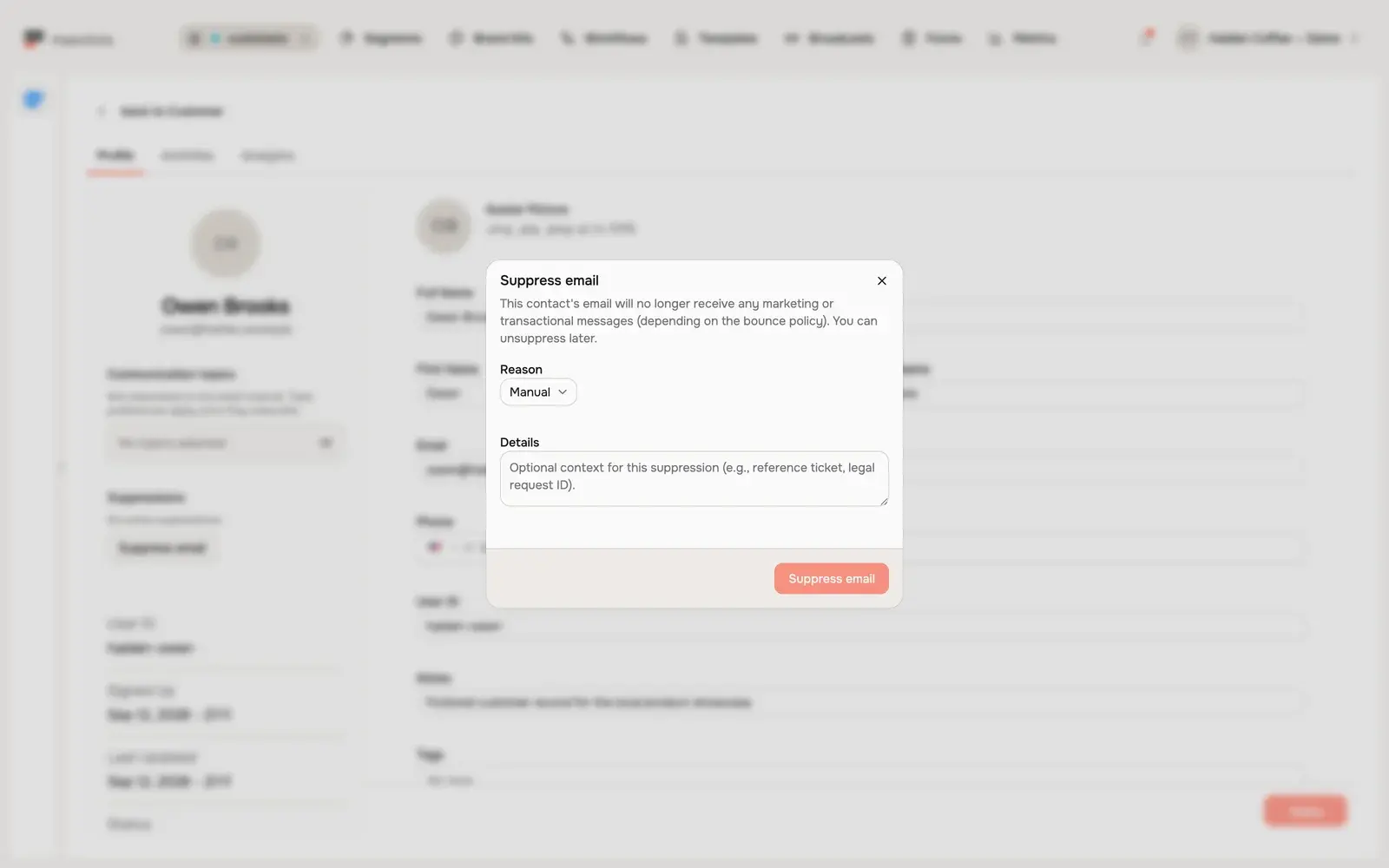
Suppressions are added one address at a time from the contact detail. There is no bulk suppress in the records table. To load a do-not-contact list in one go, use the Public API: an API key whose owner has Admin permission can create and delete suppressions on email identifiers with the manual and legal reasons. See the developer documentation.
Unsuppress an address
Removing a suppression lets mail flow to the address again. Do this only when it is appropriate for the reason.
- Find the suppressed address
Open the contact detail for the suppressed address. Its suppressions are listed alongside the contact's email address and subscription state.
- Remove the suppression
Choose to unsuppress the address and confirm. Because the block was on the address, every contact that shares it becomes reachable again, and each of those contacts updates in real time.
Because a suppression is on the address, unsuppressing one contact quietly affects every contact sharing that address across your space. Keep that in mind before you remove a block that was there for a reason.
Related deliverability topics
Suppressions, consent, and the transactional distinction work as one system. To see how opt-outs feed suppressions, read how unsubscribes and preferences work. To understand which content each suppression blocks, read understand transactional vs marketing email. To see subscription state on a contact, read add and edit contacts.
Frequently asked questions
Why does suppressing one contact affect another?
Because a suppression blocks an address, not a contact. If two contacts share the same email address, the block applies to both, and unsuppressing either one clears it for both. There is only one address being blocked, even when several contacts point at it.
Will a suppressed contact still get transactional email?
It depends on the reason. Unsubscribe, manual, legal, and spam-complaint suppressions block marketing only, so a transactional receipt still goes out. A hard-bounce suppression blocks transactional mail too, because the address itself is failing and should not be retried.
Are bounces and complaints suppressed automatically?
Yes. A hard bounce or a spam complaint automatically creates a suppression and revokes the email subscription of every contact that shares the address, with a system audit entry. Consecutive soft bounces are defined but not suppressed automatically today.
Can I add my own do-not-contact list?
Yes, one address at a time. A member with Write permission suppresses an address on the contact detail using the manual or legal reason. There is no bulk suppress in the records table, so to load a whole list use the Public API, where a key whose owner has Admin permission can create suppressions on email identifiers. This is the right way to honor direct do-not-contact requests.
How do I let a suppressed contact receive mail again?
A member with Write permission unsuppresses the address from the contact detail. If the suppression came from an unsubscribe, you may also need to restore the contact's subscription, and only with the contact's consent. Do not clear opt-out or complaint suppressions to keep emailing someone who asked to stop.
Did this article answer your question?